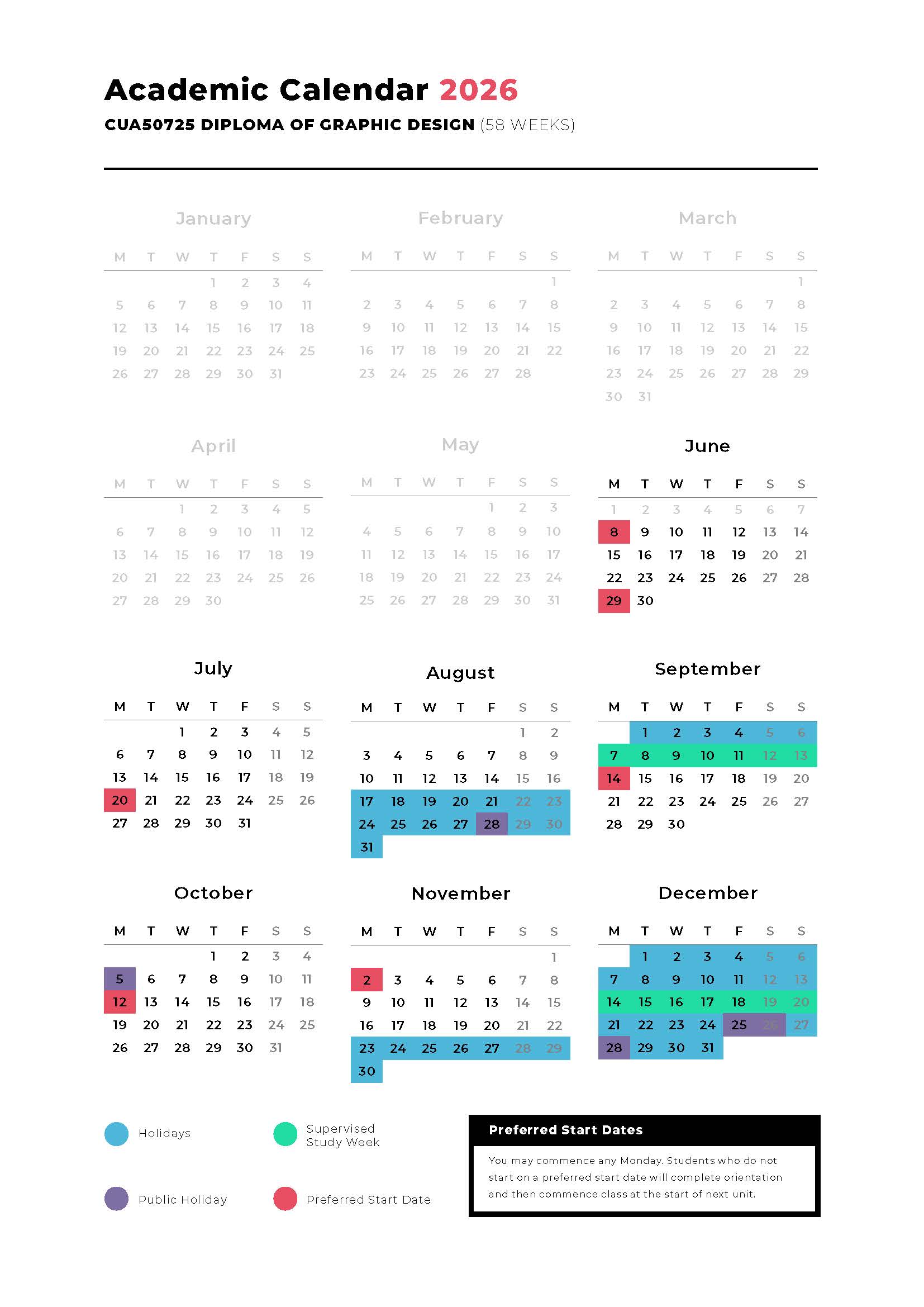
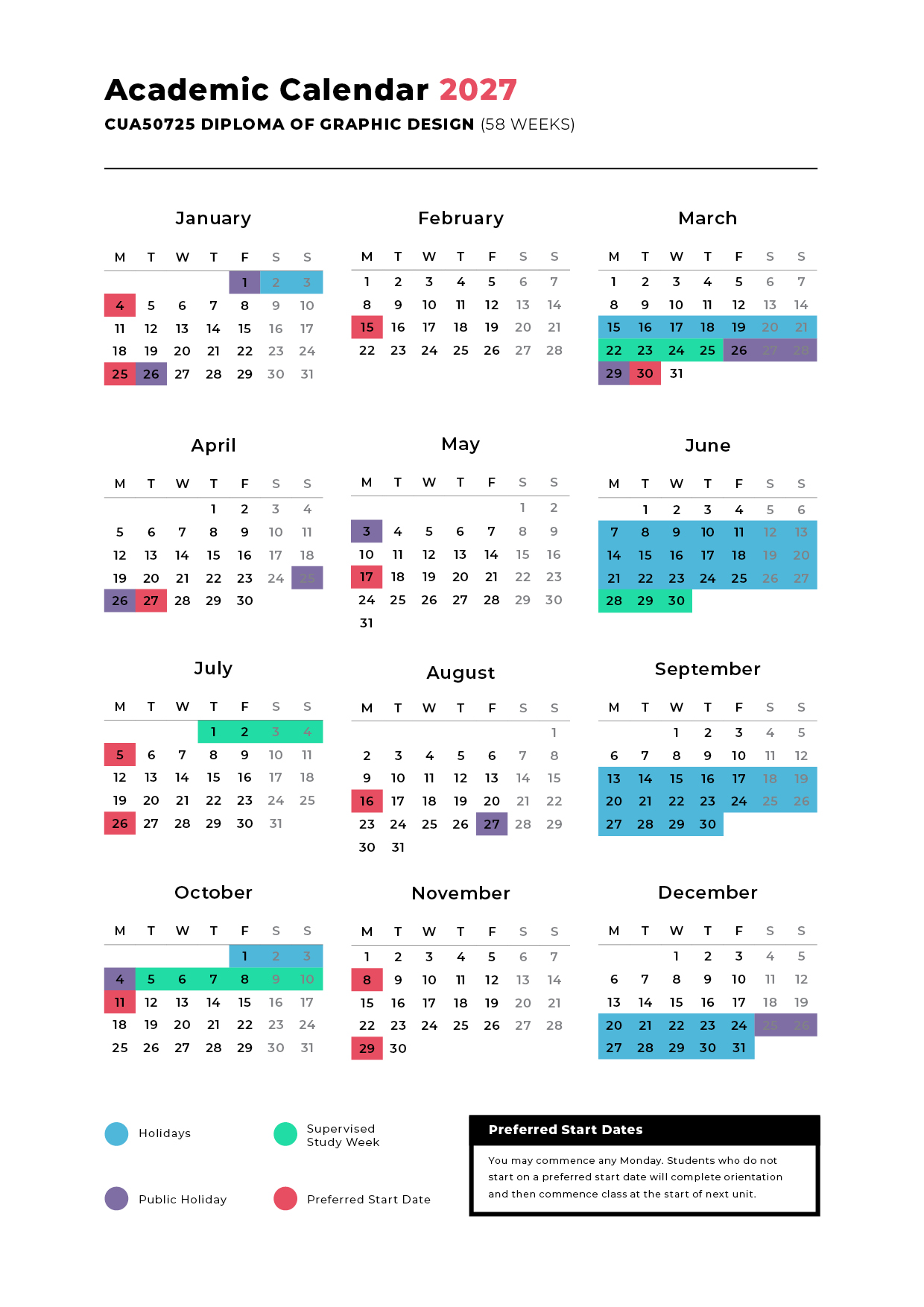
CUA50725 Diploma of Graphic Design
CRICOS Course Code: 119538M






Use your creativity, imagination and problem-solving skills to convey ideas through visual design. In the Diploma of Graphic Design, you will learn how to create logos, design social media content, develop brand identities, build a website interface, manipulate graphics and create digital art. You’ll be given the opportunity to collaborate directly with clients and other designers with amazing career experience for each project, gaining real world, hands-on experience in the on-site e studio 101 design studio.
 Monthly
 58 Weeks
Study: 42 weeks // Supervised Study: 4 weeks // Holidays: 12 weeks
 Face-to-Face
15 hrs / week
 Distance
5 hrs / week
 Graphic Designer (Junior, Mid-weight, Senior) // Freelance Designer // Publication Designer // Digital Artist
 Campus
Gold Coast
Academic Entry Requirement:
Students must provide evidence of successful completion of:
Please note: home country evidence is accepted and must be translated
English Entry Requirement:
Students must pass a minimum of one of the following English Requirements:
Please note: All English evidence provided must be within a 2 year validity period. Either within two years before the application is made, or within two years of the visa grant
Course Resource Requirements:
The following resources are required to complete this course:
Visit https://helpx.adobe.com/photoshop/system-requirements.html
Please note: students are required to purchase these items at their own expense
Entry Requirements for the Diploma of Graphic Design:
You may be eligible for Credit Transfers if you hold the same unit(s) from another provider. To be eligible; you must present your certified qualification at enrolment stage, together with the completed ‘Course Credit Form’. Once assessed, you will be notified of the outcome. Should your achieved units be equivalent, your CoE/course duration will be reduced according to the amount of time needed to complete the outstanding units.
CUAGRD503 Produce typographic design solutions
CUAGRD514 Create and manipulate graphics
This cluster of units require you to demonstrate the skills and knowledge required to create and manipulate graphics using a combination of creative design skills and technical software proficiency.
CUADIG519 Investigate technologies for the creation of digital art
CUAGRD501 Research visual communication history and theory
Research visual communication history and theory and explore traditional and digital illustration skills, techniques and methods and apply these to a practical project.
CUAACD531 Refine drawing and other visual representation tools
Drawing is more than creating artwork—it’s a way of thinking. Discover how professional creatives use drawing and visual representation to generate ideas, solve problems and bring concepts to life with confidence.
CUADES413 Develop and extend design skills and practice
BSBCMM411 Make presentations
Great ideas deserve great presentation. Build your design expertise, strengthen your creative process and learn how to present your work with confidence, clarity and impact—essential skills for any creative professional.
CUADIG304 Create visual design components
Bring your creativity to life through compelling visual design. Master the skills to create engaging graphics and media components that stand out in a digital world.
CUAGRD502 Produce graphic designs for 2-D and 3-D applications
CUAACD536 Refine 2-D design ideas and processes
Learn how to plan and produce a body of 2-D and 3-D graphic design work in response to a variety of visual communication challenges. The design work will show a well-developed command of relevant software programs and the creative ability to generate ideas.
CUAIND411 Extend expertise in specialist creative fields
Add depth to expertise in a specialist field or technique that interests you by researching and documenting current graphic design industry trends. Following this research, you will undertake a project of your choice showcasing this researched trend.
CUAPPR513 Present a body of own creative work
BSBCRT412 Articulate, present and debate ideas
Success in the creative industries requires more than great work. Develop the skills to professionally showcase your portfolio, communicate complex ideas clearly and confidently contribute to creative discussions, presentations and debates.
Take your illustration skills to the next level by refining techniques that bring your creative vision to life. Develop a distinctive artistic style and create professional-quality work that stands out from the crowd.
Discover how designers bring complex information to life through smart layout choices. Build the skills to create visually striking designs that engage audiences, enhance readability and communicate with confidence.
Use your knowledge to integrate environmentally sustainable approaches into creative art or design practice in order to reduce own ecological footprint across all areas of operation.
Who are you as a designer and what style do you want your branding to portray? Throughout this unit you will create your own brand image, business cards (ready for print!,) and create a quoting and invoicing template ready to earn the big bucks with your work!
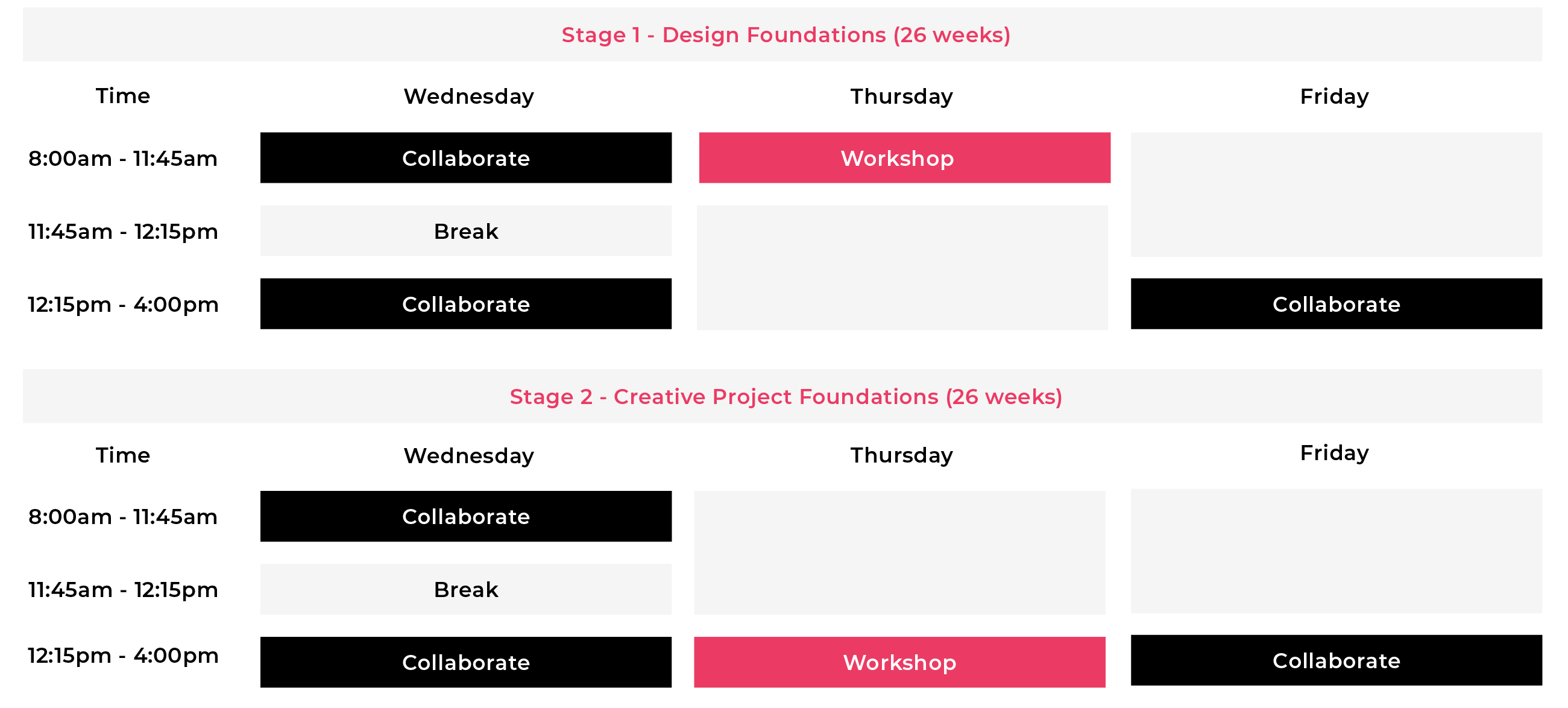
Please note; timetables are subject to change.
Workshop (Design Foundations)
During this time your mentor will deliver planned training sessions which are aimed to give you introductory graphic design skills. Activities may include presentations and planned activities to learn how to use graphic design tools and software.
Workshop (Creative Project Foundations)
Upon completion of the introductory workshops, you will be equipped to commence management real and simulated projects. This scheduled time will focus on individual components of your assigned projects.
Collaborate (team meeting)
In collaboration with students studying Project Management, you will complete a series of projects. You will be designing real life artwork and will have access to a project manager to help meet your targets. In this allocated time slot, you will have weekly project meetings with your team to evaluate your project.
Collaborate (facilitated learning & project work)
During this facilitated time, you will work collaboratively with your project team, or complete independent research tasks that have been delivered in the workshop sessions. You will practice skills that you have been taught by your mentor.
Canvas (Learner Management System)
Canvas is your online learning portal. Within this platform, you will be able to access your course learning materials, assessment requirements, and marked submissions. You will also be able to communicate with your Mentor within this platform, outside of timetabled hours. The system is user friendly and will help keep you on track throughout your studies.


Fill out the form below to learn more about our faculties and courses.

Fill out the form below to learn more about our faculties and courses.
Fill out the form below to learn more about our faculties and courses.
Fill out the form below to learn more about our faculties and courses.
Fill out the form below to learn more about our faculties and courses.
Fill out the form below to learn more about our faculties and courses.
Fill out the form below to learn more about our faculties and courses.
Fill out the form below to learn more about our faculties and courses.
Fill out the form below to learn more about our faculties and courses.
Fill out the form below to learn more about our faculties and courses.
Fill out the form below to learn more about our faculties and courses.
Fill out the form below to learn more about our faculties and courses.